Figma to HTML Conversion Services
How We Build Figma to HTML Website
Our proven process converts your Figma design into a pixel perfect, fully responsive HTML website using clean HTML, CSS, and JavaScript. Every project is developed on a private preview link, allowing you to review progress and approve the final website before delivery.
We review your Figma design, content, and project requirements before planning a clean, semantic HTML structure with responsive CSS for every page.
We hand code every page using HTML, CSS, and JavaScript to match your Figma design with pixel perfect accuracy. A private preview link lets you review progress at every stage.
Compare the HTML website with your Figma design across desktop, tablet, and mobile devices. Two rounds of revisions are included before final approval.
We optimise images, minify HTML, CSS, and JavaScript, organise the source files, and deliver a fast, SEO ready website that works on any web server.
Figma to HTML Pricing Plans
There is no theme, plugin, or builder cost built into the price of a hand coded site, only the development work itself. That is why HTML conversions are typically the most affordable way to turn a Figma file into a live, fast loading website.
- ✓Semantic HTML5 and hand written CSS
- ✓Responsive build at every Figma breakpoint
- ✓Accessible markup with proper heading structure
- ✓On page SEO and Schema markup
- ✓Image compression and lazy loading
- ✓Working contact form with spam protection
- ✓Full source files, no licence attached
- ✓Everything in Starter
- ✓Reusable component classes built with a BEM style naming system
- ✓CSS custom properties mapped from your Figma styles
- ✓Entrance animations and scroll interactions in vanilla JavaScript
- ✓FAQPage and BreadcrumbList schema
- ✓Deployment to Netlify, Vercel, or your own server
- ✓Everything in Standard
- ✓Multi step forms with client side validation
- ✓Custom JavaScript components such as tabs, filters, or carousels
- ✓Markup prepared for a future WordPress or Webflow migration
- ✓Lighthouse and Core Web Vitals performance pass
- ✓Git repository handoff for your development team
Need a multi language build, a design system style guide page, or integration into an existing codebase? Request a free custom quote →
Why Choose Our Figma to HTML Service
Professional Figma to HTML development delivers clean, semantic code, responsive layouts, faster loading pages, and better long term maintainability. Every website is built for performance, accessibility, and search engine visibility.

Every Figma to HTML website is built with semantic HTML5 elements that improve accessibility, search engine visibility, and code quality while creating a clean foundation for future development.

Figma colours, typography, and spacing are converted into reusable CSS variables, making design updates faster, easier, and consistent across the entire website.

Your Figma to HTML website is delivered as standard HTML, CSS, and JavaScript files with no CMS, themes, plugins, or recurring licence requirements.

Responsive layouts are hand coded using modern CSS techniques to ensure your Figma design looks great on desktop, tablet, and mobile devices.

Every page includes semantic markup, metadata, Schema markup, XML sitemap support, and a search engine friendly structure to improve visibility.

Google Analytics 4 and Google Tag Manager are integrated into your HTML website using lightweight code for accurate tracking without unnecessary overhead.

Contact forms include accessible markup, client side validation, spam protection, and flexible integration with your preferred form handling service.

Without plugins, databases, or CMS software, your Figma to HTML website has a smaller attack surface and requires less ongoing maintenance.

Images, HTML, CSS, and JavaScript are optimised for fast loading, better Core Web Vitals, and an improved browsing experience across all devices.
Figma Design System in HTML
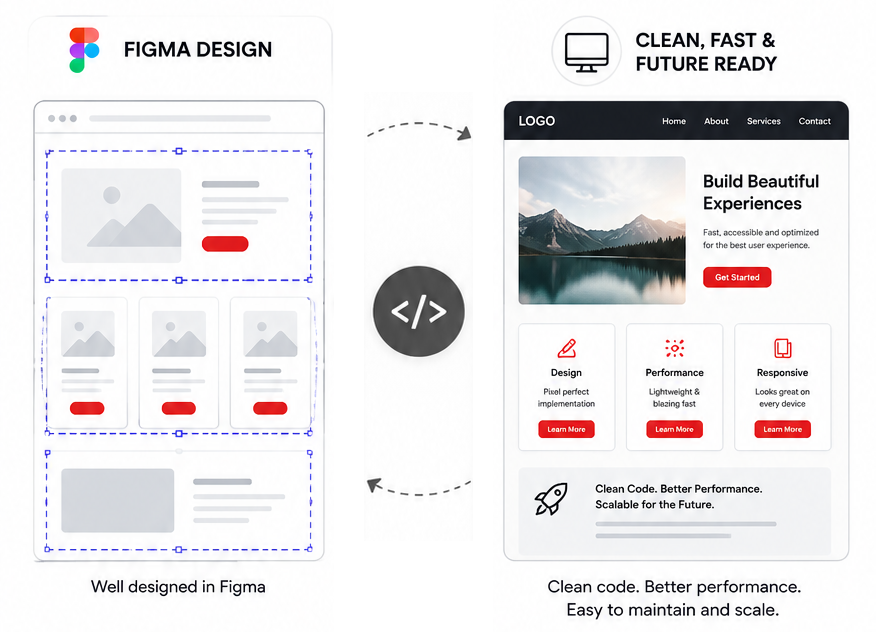
A professional Figma to HTML conversion is more than matching the visual design. We transform your Figma styles and components into clean, reusable HTML and CSS, creating a lightweight, responsive website that is easy to maintain, scale, and integrate with any backend or content management system.
Your website is built with semantic HTML, reusable CSS components, and modern front end development practices. This keeps the code organised, improves performance, and makes future updates faster without unnecessary frameworks or generated code.
- ✓Figma auto layout frames translated into CSS Grid and Flexbox structures
- ✓Figma colour and text styles defined as CSS custom properties
- ✓Repeating components written once as reusable, named CSS classes
- ✓Hover, focus, and interaction states matched using plain CSS and JavaScript
- ✓Lightweight code without unnecessary frameworks or plugins
- ✓Responsive layouts optimised for desktop, tablet, and mobile
Figma to HTML vs Other Platforms
Compare Figma to HTML with other website development options to understand the differences in speed, performance, maintainability, content editing, and long term flexibility before starting your project.
| Factor | Figma to HTML | Framer to HTML | XD to HTML | PSD to HTML |
|---|---|---|---|---|
| How layout structure is defined | Auto layout frames mirror how HTML containers should stack and resize | Stack and auto sizing components define resize behaviour clearly | Mostly fixed width artboards, resize behaviour is rarely defined | One flat canvas only, no layout logic to read at all |
| Reusable colour and type styles | Named styles and variables map directly to CSS custom properties | Style presets exist and translate reasonably well to CSS variables | Character and colour styles exist but are applied inconsistently | No native style system, every value is read manually from each layer |
| Component and instance reuse | Components and variants map cleanly to reusable HTML and CSS classes | Component overrides translate well into reusable markup | Symbols exist but are used less consistently across artboards | No components, every repeated element is rebuilt by eye |
| Icon and graphic export quality | Clean vector export as inline SVG, scales without quality loss | Vector export available, generally clean SVG output | Vector export available but effects sometimes flatten on export | Raster only, icons ship as image files instead of scalable code |
| Spacing and sizing precision | Auto layout padding and gap values translate directly into CSS | Padding and gap settings translate directly into CSS | Spacing must be measured manually between fixed elements | Spacing must be measured pixel by pixel from a flat image |
| Typical conversion timeline | Fastest, structure and tokens reduce guesswork | Comparable to Figma for most marketing site layouts | Slower, more manual interpretation of spacing and behaviour | Slowest, the entire layout is rebuilt from a static image |
| How common this request is today | Most common, the current industry standard design tool | Growing, common for teams that prototype interactions in Framer | Declining, mostly legacy files from before Figma adoption | Occasional, usually older brand assets or print derived files |
Working from Framer, Adobe XD, or a PSD file instead of Figma? We convert all four into hand coded HTML using the same process described above, the quote simply reflects the extra interpretation time a less structured file requires.
Who Chooses Our Figma to HTML Service
Our Figma to HTML service is trusted by designers, digital agencies, startups, SaaS companies, and businesses that need fast, lightweight, and pixel perfect websites. Every project is hand coded with clean HTML, CSS, and JavaScript, delivering responsive websites with complete code ownership and long term flexibility.

Freelance Designers
Convert Figma designs into clean, responsive HTML websites for portfolios, client presentations, and landing pages. Deliver fast loading websites without the complexity of a content management system.

Digital Agencies
Provide clients with hand coded HTML, CSS, and JavaScript that is easy to customise, integrate with modern frameworks, or migrate to WordPress, React, Vue, or other platforms.

Startups and SaaS
Launch marketing websites, product pages, and MVP landing pages quickly with lightweight HTML websites built for speed, scalability, and long term flexibility.

Development Teams
Accelerate front end development with clean, semantic HTML and reusable CSS that integrates easily into custom applications, static site generators, or modern JavaScript frameworks.

Marketing Teams
Create high performance landing pages for advertising campaigns, product launches, and lead generation with fast loading HTML websites optimised for conversions and Core Web Vitals.

International Clients
Choose Figma to HTML for complete ownership of your source code, transparent project pricing, responsive development, and the freedom to host your website anywhere without platform restrictions.
Figma to HTML FAQs
Learn how our Figma to HTML service works, what is included, expected turnaround times, responsive development, website hosting, SEO, and the information we need to begin your project.
What is Figma to HTML conversion?
The result is a fast, SEO ready, and lightweight website that can be hosted on any web server. Because the code is clean and standards compliant, your website is easier to maintain, integrates with any backend or CMS, and provides complete ownership of the source code.
Why choose hand coded HTML instead of Figma code export or a plugin?
This approach improves website performance, accessibility, SEO, and cross browser compatibility while giving you clean source code that is easy to maintain, integrate with any backend or CMS, and scale as your project grows.
Do I need WordPress or any other platform to use the finished website?
How much does Figma to HTML conversion cost?
How long does a Figma to HTML project take?
Will the hand coded HTML site be responsive and accessible?
Can a hand coded HTML site rank well in search engines?
Can I convert my HTML website to WordPress or Webflow later?
Will I be able to update the HTML website myself without a developer?
Explore Our Other Conversion Services
Convert Figma, Framer, Adobe XD, PSD, and Sketch designs into professional WordPress, Elementor, Divi, Webflow, Shopify, and responsive HTML websites. Every project is built with pixel perfect accuracy, responsive layouts, clean code, and SEO ready development.

Your Figma design converted to a full WordPress website with Elementor Pro or Divi, global design kit, SEO, and CMS training.
Get a Free Quote Learn more →
Pixel perfect Figma to Elementor Pro conversion with global design kit, Theme Builder, and full mobile responsive build.
Get a Free Quote Learn more →
Front end Divi Builder conversion with global presets, Theme Builder templates, and native WooCommerce module support.
Get a Free Quote Learn more →
Convert your Framer prototype or published site into a fully editable WordPress website with Elementor Pro or Divi.
Get a Free Quote Learn more →
Hand coded HTML and CSS export from your Framer design, with no Framer platform dependency and no monthly fee.
Get a Free Quote Learn more →
Design led builds on Webflow's hosted CMS for teams that want a visual editor with built in content management.
Get a Free Quote Learn more →
Custom WordPress builds without an existing Figma file. From brief to live site with Divi, Elementor Pro, or a custom theme.
Get a Free Quote Learn more →Full Divi website builds from scratch without a Figma file. Bespoke layouts, global presets, Theme Builder, and SEO setup.
Get a Free Quote Learn more →